Appointment Directory
Navigation
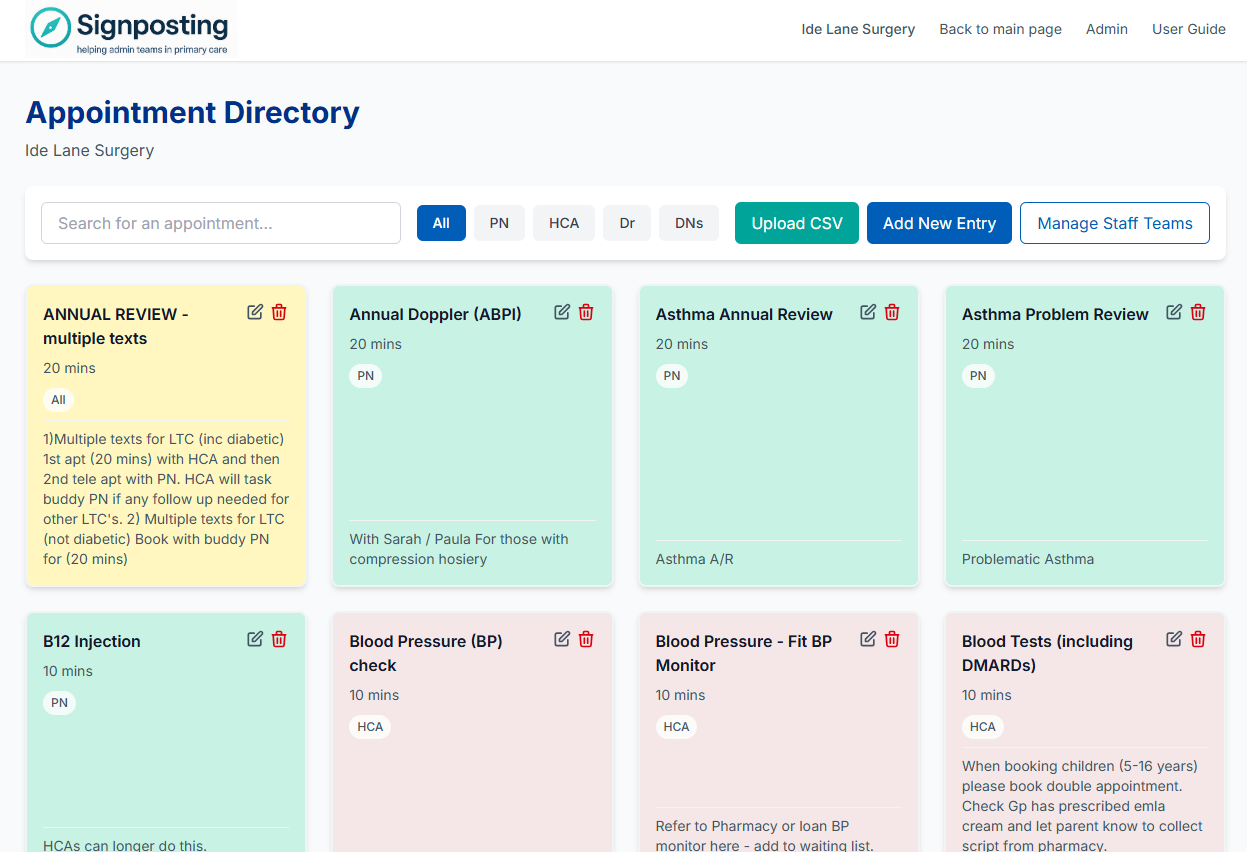
The Appointment Directory provides a simple, searchable catalogue of local services and appointment types. Designed for reception staff, it helps teams quickly find the right appointment option and understand booking rules.
Overview
The directory is fully integrated into the top-level navigation and serves as a reference tool for:
- Understanding appointment types available
- Identifying which staff team handles what
- Finding booking rules and duration
- Supporting new receptionist training
Appointment Types
Each appointment entry includes:
Core Information
- Name — Clear, descriptive appointment type
- Staff Team — Which team handles this appointment
- Duration — Appointment length in minutes
- Colour Coding — Visual identification by staff team
- Notes — Additional guidance or rules
Status
- Enabled/Disabled — Control visibility
- Default Appointments — System-provided templates
- Custom Appointments — Surgery-specific types
Staff Teams
Staff teams organise appointments and provide visual grouping through colour coding.
Dynamic Teams
Admin team members can add, edit, and manage staff team options. This allows surgeries to reflect their actual organisational structure.
Team Features
- Custom Labels — Surgery-specific team names
- Colour Coding — Visual identification
- Ordering — Control display order
- Enabled/Disabled — Show or hide teams
Built-in Teams
Common team types are available by default:
- Practice Nurse (PN)
- Healthcare Assistant (HCA)
- Doctor (Dr)
- All Staff
- And more…
Surgeries can modify, add, or remove teams to match their structure.
CSV Import
Rapid bulk updates are possible through CSV import functionality.
Import Process
- Prepare CSV file with appointment data
- Upload via admin interface
- System validates and processes
- Appointments created or updated
CSV Format
- Headers: Name, Staff Team, Duration, Notes, etc.
- One row per appointment type
- Validation ensures data quality
- Errors reported for correction
Use Cases
- Initial setup from existing lists
- Bulk updates after reorganisation
- Regular maintenance updates
- Importing from other systems
Filtering
The directory supports multiple filtering options to help staff find appointments quickly.
Filter Types
- Search
- Text search across names and notes
- Instant results as you type
- Highlights matching terms
- Staff Team Filter
- Filter by specific staff team
- See all appointments for a team
- Useful for team-specific workflows
- Status Filter
- Show enabled only (default)
- Include disabled for admin
- Quick visibility toggle
Filter Features
- Combine multiple filters
- Clear filters easily
- Persistent preferences
- Fast performance
Reception Workflow Support
The directory is designed to support reception staff workflows:
Quick Reference
- Fast lookup of appointment types
- Clear booking rules
- Duration information
- Staff team identification
New Staff Training
- Comprehensive catalogue
- Clear, plain English descriptions
- Visual colour coding
- Notes for additional guidance
Integration with Symptoms
- Referenced in symptom instructions
- Links between symptoms and appointments
- Consistent terminology
Colour Coding
Appointments are colour-coded by staff team for quick visual identification.
Benefits
- Instant team recognition
- Faster scanning
- Visual organisation
- Reduced cognitive load
Customisation
- Per-team colour assignment
- Surgery-specific palettes
- Accessible colour contrasts
- NHS design principles
Admin Management
Surgery admins can fully manage the appointment directory:
Actions Available
- Add new appointment types
- Edit existing appointments
- Import from CSV
- Manage staff teams
- Enable/disable appointments
- Set default values
Bulk Operations
- CSV import for bulk updates
- Bulk enable/disable
- Team-wide changes
- Efficient maintenance
Integration with Symptoms
The appointment directory works closely with the symptom library:
Cross-Referencing
- Symptoms reference appointment types
- Consistent naming maintained
- Directory supports symptom guidance
- Unified terminology
Workflow Support
- Staff checks symptom instructions
- Instructions reference appointment types
- Staff looks up appointment in directory
- Clear guidance on booking rules
Best Practices
For Admins
- Keep directory up to date
- Use clear, consistent naming
- Add helpful notes
- Organise by staff teams logically
- Import CSV for bulk updates
For Reception Staff
- Use search to find appointments quickly
- Filter by staff team when needed
- Reference notes for booking rules
- Report missing types via suggestions
For New Staff
- Browse directory to learn options
- Use colour coding to identify teams
- Read notes for guidance
- Ask colleagues for clarification
Future Enhancements
Potential improvements under consideration:
- Quick-book rules integration
- Enhanced CSV validation
- Appointment availability integration
- Analytics on directory usage
Related Pages
- Symptom Library — How symptoms reference appointments
- Multi-Surgery & RBAC — Admin permissions
- Developer Guide — Technical implementation
Screenshots
Appointment Directory – reception view
Last updated: December 2025